Moshi moshi...
sehubungan sebentar lagi mau lebaran..
nihh ada kartu lebaran jepang..
hhoo...



Saturday, September 20, 2008
Kartu Lebaran Jepang.
Saturday, September 13, 2008
update hacking privat photo !!
neh kalo mau lebih cepet generate buka privat nya..
buka disini aja: http://private.friendsterlayoutrequest.co.cc/?
daripada lama nungguin ngebuka nya..
sama kyk di bawah kok caraya..
sory baru ngasih tau..
wkakakakk...
Thursday, September 11, 2008
nge jebol privat photo/HACK privat photo di friendster.
Banyak para FS mania ato Friendsterholic yang penasaran kan dengan apa isi Private Pohotos teman kita? Atau bahkan saat kita hunting friend lewat Friend List di FS teman kita, seringkali kita temukan Private foto bahkan Private Profile? Nah penasaran pingin tahu cara melihat foto pribadi di Private Photos Friendster teman kamu? berikut caranya..
1)buka web ini: http://d60pc.com/friendster/
2)cari profile friendster korban yg akan anda lihat isi privat photo nya.
3)ambil UID dari user tersebut contoh: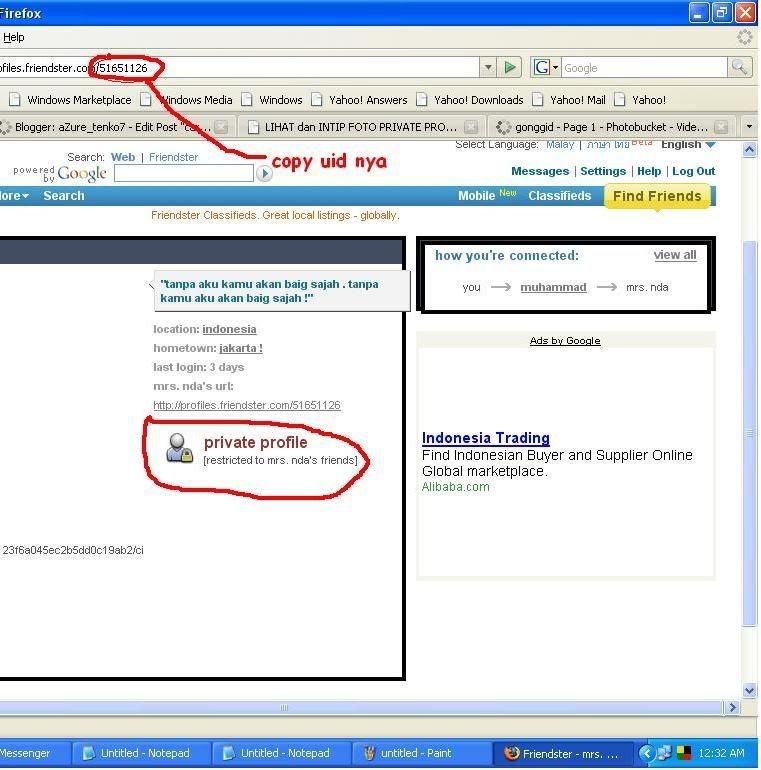
4)paste di web yg sudah kamu buka sebelum nya.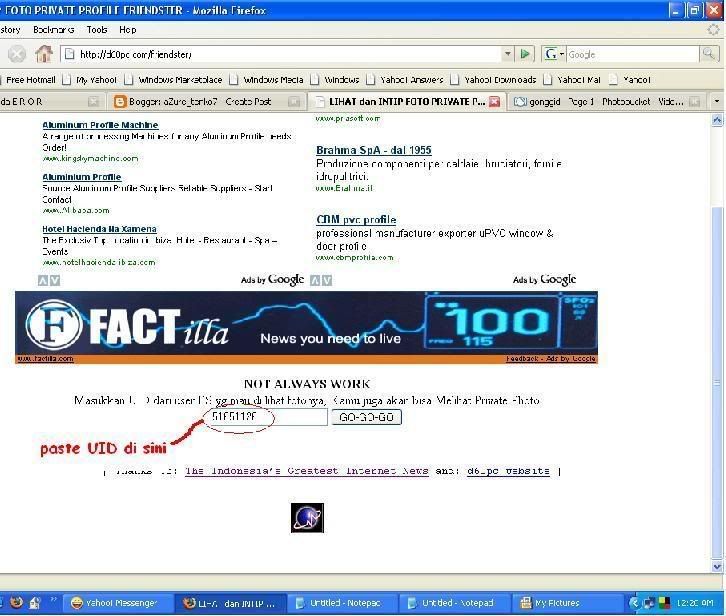
5)kemudian tekan enter.
6)jika suadah kebuka klik album privat yg ada di web tersebut, dan anda akan melihat semua isi photo privat korban.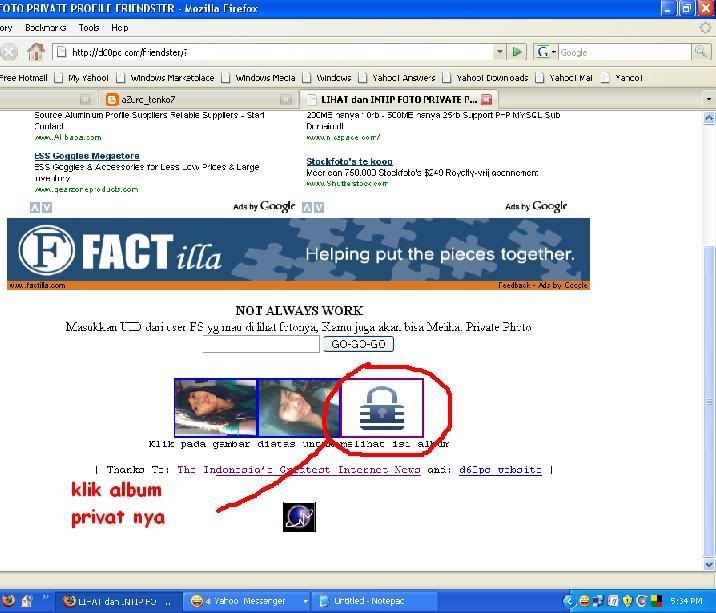
okok !! selamat mencoba..
mari berkreasi bersama saya..
yang uda bisa nge jebol privat photo selamat yaa..
nanti saya akan post yg lebih menarik lagi..
Monday, September 8, 2008
tips ngotak ngatik HP :D
This is some tricks for any phone vendor, I hope this tricks will help and useful for you. First, to get your phone IMEI (International Mobile Equipment Identity) you can simply type *#06# (its work for all phone) and this is what will you get :
XXXXXX XX XXXXXX X
TAC FAC SNR SP
TAC = Type approval code of your Mobile
FAC = Final assembly code of your cellphone
SNR = Serial number of your Phone
SP = Spare
Be sure that this IMEI number is similar with your phone box (if you have secondhand phone).
Nokia Phone Tricks :
To enter in the secret menu in Nokia Phone
On the main screen type *#92702689# (Show all manufacture). It will take you to a secret menu where you may find some of the information below :
1. Displays Serial Number.
2. Displays the Month and Year of Manufacture
3. Displays (if there) the date where the phone was purchased (MMYY)
4. Displays the date of the last repair - if found (0000)
5. Shows life timer of phone (time passes since last start)
Else :
*#0000# : View Software version
*#7780# : Restore factory settings
*#3370# : Enable EFR (To disable, Type it again. Phone Automatically Restart)
*#67705646# : Clear LCD Display (Operator Logo)
*#2820# : Bluetooth device address
*#746025625# : SIM lock allowed statue
*#62209526# : Display the MAC address
#pw+1234567890+1# : Show if SIM restrictors.
*#4720# : half rate Codec activation (To disable, Type it again)
*#3925538# : Delete the contents and code of wallet
*#7328748263373738# : Reset Phone Code. Default code is 12345
Speed Dialing From Simcard contact (not stored in mobile phonebook)
Type number followed by # then call.
Example: 1# or 2# or 21#
Sony Ericcson Phone Tips :
To enter in the secret menu in SE Phone :
with joystick do > * < < * < * (press right,*,left,left,*,left,*) and you may find some information below :
1.Service Info
a. Software Version
b. SIMlock
c. Configuration
2. Service Setting
a. Contrast
3. Service Test
a. Display
b. LED/Illumination - *This test is very cool
c. Keyboard
d. Buzzer
e. Vibrator
f. Earphone
g. Microphone
h. Real Time Clock
i. Joystick Counter
Motorola Phone Tips :
Code to lock keys. Press together *7
Note: [] (pause) means the * key held in until box appears.
[] [] [] 0 0 8 [] 1 [] : Select phone line - (use this to write things below the provider name)
[] [] [] 1 0 5 [] 1 [] : Add phonebook to main menu
[] [] [] 1 0 7 [] 1 [] : Add messages to main menu
[] [] [] 1 0 8 [] 1 [] : Copy SIM memory (phonebook menu)
[] [] [] 1 1 3 [] 1 [] : Eng Field options (main menu)
[] [] [] 1 0 1 [] 1 [] : Slow (Frequency of search menu)
[] [] [] 1 0 2 [] 1 [] : Medium (Frequency of search menu)
[] [] [] 1 0 3 [] 1 [] : Fast (Frequency of search menu)
[] [] [] 1 1 9 [] 1 [] : Enable EFR
[] [] [] # # # [] 1 [] : Function
[] [] [] 0 0 4 [] 1 [] : Change pin
[] [] [] 0 0 5 [] 1 [] : Unblocking using the “puk” number
You can change GSM frequencies to 900/1800 by entering the enginnering model.
Following the below steps:
enter menu and press 048263* quickly,
then you will enter the secret engineering menu under “Opcode”
input 10*0*3 for GSM 900
10*0*4 for GSM 1800
10*0*5 for GSM 1900
10*0*6 for dual band GSM 900/1800
10*0*7 for dual band GSM 850/1900
To add extra message space 4 your Motorola C350 C450 C550 or C650,press menu button, press 048263* quickly, then on the popup menu enter 47 press ok.press 50 and ok.press 1 ok.press 64 ok.press 1 ok.press 186 and ok.You will receive an extra 50 msgs memory space.Switch phone off and back on.
Samsung Phone Tips :
The master reset code is:
#*7728#
This will not delete anything from your
mobile phone, but set each and eveything to its
default/standard setting as it was on the time of purchase.
Lock Manager
*2767*2878# : EPROM Reset
*2767*3855# : Master Reset
*#2767*63342# : Media Reset
*2767*667# : MMS reset
*2767*927# : WAP Reset
If you’re Phone will not reset by using those code:
*2767*637#
*2767*688#
#*7337#
*#9998*3323#
*#9998*627837793#
*2767*7822573738#
To unlock your phone put a sim from another company,
now type *#9998*3323# it will reset your phone. Push exit and then push 7,
it will reset again. Put your other sim in and it will say sim lock,
type in 00000000 then it should be unlocked. Type in *0141# then
the green call batton and it’s unlocked to all networks.
This code may not work on the older phones and some of the newer phones.
If it doesn’t work you will have to reset your phone without a sim in it
by typing *#2767*2878# or *#9998*3855# (not tested)
Other Samsung Codes
*#9998*4357# : Help Menu
*#9998*5282# : Java menu (GRPS/CSD settings for JAVA server)
*#9999#0# : Monitor Mode
*#9999# or *#9998*9999# : Software Version
*#8888# or *#9998*8888# : Hardware Version
*#9998*746# or *#9998*0746# or *#0746# : Sim Infos
*#9998*523# or *#9998*0523# or *#0523# : Display Contrast
*#9998*842# or *#9998*0842# or *#0842# : Vibration On (until you push OK)
*#9998*289# or *#9998*0289# or *#0289# : Buzzer On (until you push OK)
*#9998*288# or *#9998*0288# or *#0288# : Battery & Field Infos
*#9998*377# or *#9998*0377# : Error log
*#9998*778# or *#9998*0778# or *#0778# :Sim Service table
*#9998*782# : show date and alarm clock
*#8999*638# : show network information
*#9998*5646# : change operator logo at startup
*#9998*76# : production number
*#9998*968# : view melody for alarm
*#9998*585# : Non-Volatile Memory (NVM)
*#3243948# : Digital Audio Interference Off
*#32436837# : Digital Audio Interference On
*#1234# : Sofware Version
*#2222# : Hardware Version
*#0842# : Vibrator Test
*#0289# : Buzzer Test
*#0228# : Battery Statue
*#0782# : RTC Display
*#0523# : LCD Contrast
*#0377# : NVM error Log
*#5646# : Logo set
*#0778# : SIM Service Table
*#0638# : SIM Network ID
*#0746# : SIM Info
*#076# : Production no
*#2576# : SIM errors
LG Phone Tips :
2945*#01*# : Secret menu for LG
*#07# : IMEI and SW (LG 510)
*8375# : Software version (LG B1200)
*6861# : Recount cheksum (LG B1200)
1945#*5101# : Simlock menu (LG B1200)
2945#*5101# : Simlock menu (LG 510W, 5200)
2945#*70001# : Simlock menu (LG 7020, 7010)
2947#* : Simlock menu (LG 500, 600)
Code to reset phone :
- Phone without SIM
- Enter 277634#*# or 47328545454#
- Select ‘Factory Reset’
Code to enter UNLOCK MENU :
- Phone wit SIM inside
- Enter 2945#*88110#
Test Menu 8330 : 637664#*#
Test Menu 8180 V10a : 49857465454#
Test Menu 8180 V11a : 492662464663#
Test Menu 8130-8138 : 47328545454#
Test Menu 8110-8120 : 277634#*#
BenQ-Siemens Phone Tips :
Language Menu for BenQ-Siemens mobile
English menu:
*#0001#
Deutsch menu:
*#0049#
Secret Code for BenQ
*#0606# remove sim card before
Unlock Sim:
*#0003*(secret code)#
Bonus Screen:
*12022243121
Factory settings:
Type *#9999# to reset factory settings
Nb : Kamu bisa mencuri dengar pembicaraan orang lain secara tersembunyi jika punya dua HP, caranya aktifkan “Automatic Answer” pada “headset profile” dan set nada dering ke “mute”, dekatkan headset pada mikropon hp (kreatifitas kamu), taruh di tempat tersembunyi (bawah meja), dan telpon dengan Hp yang satu lagi,dan ….. (Semua trik ini hanya sekedar informasi, resiko ditanggung sendiri dan tidak menerima komplain)
Deface
Deface
adalah salah satu thnik hacking untk menuTupi page lawan dgn menutupi page bru yg suda d sediakan tentu'a,
hal ini biasa'a tjadi pd Blog ato web" yg sstm scurity'a lemah, tp tergantung dr hackr'a juda si
hehehe
DDOS juda salah satu tehnik hacking juda lowh tp itu brupa seragan (",)v
navigation layout Friendster
Tutor membuat CSS Navigational
- Buka lah Browser . Mozila Fire fox / Internet Exploler
- Buat Lah Web site Pribadi .Contoh : di www.freewebs.com atau www.ripway.com
- mulai Lah Membuat CSS . bila Tidak Mengerti. Cobalah untuk mengcopy hasil CSS orang lain Pada web site berikut: www.vixenart.com
- pilih tampilan/gambar layout yang anda suka(pilih navigational CSS).gambar layot tersebut.
Nanti akan muncul Kotak Code
- code Yang Di ambil Hanya URL nya saja.(hanya berlaku pada .CSS dan .JS contoh :
http://h1.ripway.com/nekyo7/Deathnote/John.Css
- Apa bila code sudah Di copy. Buka Tab browser baru lalu Masukan URL nya.
- nanti akan muncul Code – code yang di sebut Html.
- Klik kanan Mouse pada halaman tersebut, lalu pilih save page as
- save File tersebut dengan nama yang di ingin kan.
- Kemudian Buka lah website yang Baru di buat dengan Mozila Firefox..
Apa bila membuat di freewebs.com:
- klik My pages
- klik managerfile
- kemudian klik sigle upload file.
- Akan muncul kotak upload .klik browser dan pilih file CSS Yang sebelumnya
- Klik upload
- Klik kanan file yang sudah di upload pada kotak file Website,pilih copy link location
Atau bila membuat Di ripway.com
- klik My file
- buat Folder
- upload File CSS yang Kamu Pilih
- Jika selesai, klik kanan Format CSS nya.
- Pilih Copy Link Location
Masukan hasil copy link tersebut dalam code ini
dngan format:
< img src=&hapustulisanini#1;">" onerror=" a=document.createElement('link');a.type='text/css';a.rel='st ylesheet';a.media='screen';a.href='MASUKAN URL CSS kamu';navBg.appendChild(a);this.style.display='none'"
tambahkan caracter : < .sesudah kamu mengkopy. caracter tersebut di letakan sebelum style dan img
(kekurangan format ini Bila Telah di Masukan, ini akan automatis menghilangkan
carakter: &hapustulisanini#1;) maka Jgn lupa Kalo telah save edit profile masukan Kembali Caracter ntersebut)
Lalu Copy hasil code tersebut , lalu letakan di dalam
Media BOX untuk format pertama.
Who I Want to Meet Box untuk Format Kedua.
Bila Ingin format css Buatan sendiri. Buka file CSS pada website mu,yang ingin kamu format.
Lalu Ubahlah URL Gambar, dengan gambar yang kamu ingin kan.
kalo kurang ngarti, tnya ke gw
Wednesday, August 13, 2008
wew, Cara benahin blog
Blog kita akan terasa lebih cantik apabila di isi dengan berbagai hiasan seperti jam, buku tamu, beberapa logo, dan juga lain - lain sebagainya. Sebetulnya hiasan ini bisa kita dapatkan dengan cara mudah karena hiasan ini sebetulnya free, jadi apabila anda melihat blog yang ada hiasan seperti jam atau lain - lain anda tinggal menklik saja hiasan itu maka kita akan dibawa ke web penyedia hiasan itu. Tapi sebelum kita mengambil hiasan itu sudah pasti terlebih dahulu kita harus melakukan registrasi.
Untuk masalah hiasan saya akan memberikan beberapa contoh saja. karena saya yakin yang lainnya anda pasti akan bisa setelah mempelajari dikit demi sedikit tentang kode HTML yang ada dari hiasan itu.
Memberikan Hiasan Jam pada Blog kita. caranya adalah :
Memasang Buku Tamu pada Blog :
- Daftar terlebih dahulu di www.shoutmix.com
- Setelah daftar pada kolom yang berjudul style, klik menu appearance
- Silahkan klik menu pulldown di samping tulisan Load From Preset untuk mengatur tampilan buku tamu anda, silahkan pilih yang sesuai dengan keinginan anda. Jika sudah selesai klik Save Setting.
- Untuk mendapatkan kode HTML dari shoutbox anda, silahkan klik Use Shoutbox yang berada di bawah menu Quick Start
- Klik tulisan Place Shoutbox on web page. Isi lebar dan tinggi shoutbox yang di inginkan
- Copy seluruh kode HTML yang ada pada text area yang berada di bawah tulisan Generated Codes, lalu simpan di program Notepad anda
- Klik Log out yang berada di atas layar anda untuk keluar dari halaman shoutmix anda. Silahkan close situs tersebut.
- Selesai
Untuk menempatkan kode HTML shoutbox tadi pada blog anda, silahkan ikuti langkah-langkah berikut ini.
Untuk blogger dengan template klasik :
- Log in terlebih dahulu ke blogger.com dengan id anda
- Klik menu Template
- Klik Edit HTML
- Paste kode HTML shoutbox anda yang telah di copy pada notepad tadi di tempat yang anda inginkan
- Untuk jelasnya saya ambil contoh dengan shoubox milik saya, untuk menempatkannya tinggal klik Edit pada browser lalu pilih Find (on this page).. trus tuliskan kata buku tamu lalu klik find, maka kita akan langsung di bawa ke tulisan tersebut. Jika sudah ketemu tulisan tadi silahkan paste kode HTML shoutbox nya.
- Klik tombol Preview untuk melihat perubahan yang kita buat.
- Jika sudah cocok dengan perubahan tadi, klik Save Template Changes
- Selesai
Sedikit Clue, agar shoutbox anda sesuai dengan ukuran lebar sidebar , anda bisa merubah ukuran lebar ataupun tinggi dari shoutbox , caranya anda tinggal merubah angka Width (untuk lebar) dan Height (untuk tinggi) dari dalam kode HTML shoutbox tersebut.
Untuk Blogger baru :
- Silahkan Login dengan id anda
- Klik menu Layout
- Klik Page Element
- Klik Add a Page Element
- Klik tombol Add to Blog yang berada di bawah tulisan HTML/JavaScript
- Tuliskan judul shoutbox anda pada form title. Contoh : Buku tamu ku, atau my guestbook atau apa saja yang anda suka
- Copy paste kode HTML shoutbox anda di dalam form Content
- Klik tombol Save Changes
- Drag & Drop element yang telah anda buat tadi di tempat yang di sukai
- Tekan tombol Save
- Selesai
Good Luck !!!
Sedikit Tambahan...
Pasang Statistik atau Tracker
Sekarang tugas kita adalah memasukan kode yang sudah kita dapat ke dalam blog, ikuti langkah- langkah berikut : )
)
khusus blog dengan template klasik :
Tambahan Lagii...
Beberapa web yg bisa kamu jelajahi Template - Template nya..
http://www.blogger-templates.blogspot.com
http://www.blogcrowds.com/resources/blogger_template.php
http://www.bloggertemplates.org
Good Luck Again !!!
tanya sama reyhan aliy..
huahuaa...
Selamat Mencoba Yaa..
Jangan pernah putus asa untuk berkreasii..
Subscribe to:
Posts (Atom)
